¶ Minecraft's authentication servers
¶ Understanding Minecraft authentication servers
¶ So what is an authentication server?
When you launch Minecraft and connect to a multiplayer server, the game communicates with Mojang’s authentication servers to verify that your login credentials are valid.
If those servers aren’t reachable, Minecraft can’t validate your identity, meaning multiplayer features like joining servers or Realms will be unavailable.
You might see errors like:
- “Failed to login: The authentication servers are currently down for maintenance.”
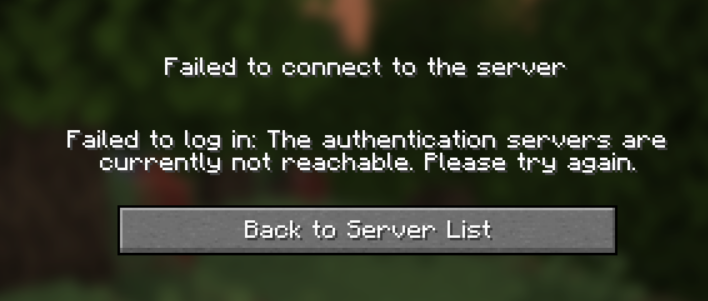
- “Failed to login: The authentication servers are currently not reachable. Please try again.”
- Or similar.
An example of the error you may see
¶ Why do authentication servers stop working?
There are several potential reasons for downtime:
-
Unexpected server problems
Outages can occur due to backend errors, high traffic, or infrastructure failures.
-
Routine maintenance
Mojang may temporarily take systems offline for updates or improvements.
-
Client-side issues
Sometimes the error is local—bad internet connections, corrupted cache, or outdated clients can trigger login failures, or even bad DNS.
¶ Determining if the Minecraft authentication servers are offline?
Sometimes, the issue isn’t on your side—it’s Mojang’s infrastructure. The first step should always be to check the current status of their services.
Ways to check:
- Visit @MojangStatus on X (formerly Twitter) for live updates.
- Use status trackers like Minecraft Down Detector to see user-submitted reports.
- Check the Minecraft subreddit (/r/Minecraft), where outages are often discussed as they happen.
¶ How to remain up-to-date
While you can’t eliminate server outages completely, here are a few things you can do to reduce the hassle:
- Bookmark Mojang’s status page
- Join Minecraft communities on Reddit or Discord to stay updated
- Consider hosting your own server with high uptime reliability (like with Delta Networks, who provide 24/7 server availability)
¶ How to fix “Authentication Servers Are Down” on your local PC
If Mojang reports no problems and other players can connect, the issue might be on your end. Try the following steps:
¶ 1. Restart the Game
- Exit the launcher completely (not just minimize)
- Reopen it and try again
A full relaunch can often reset the session and re-establish a valid connection.
¶ 2. Sign Out and Back Into Your Account
- Open the Minecraft launcher
- Log out of your profile (top-right corner)
- Sign in again with your Mojang or Microsoft credentials
This process refreshes your session token and helps resolve login issues.
¶ 3. Check Network Connectivity
- Visit another website or open a different online game
- Restart your router or modem
- If you’re on Wi-Fi, try using a wired Ethernet connection
Network instability is a common reason Minecraft can’t reach Mojang’s services.
¶ 4. Flush DNS Cache (Windows OS Users)
Sometimes DNS resolution issues interfere with Mojang’s servers. To clear the cache:
-
Open Command Prompt as Administrator
-
Run the following:
ipconfig /flushdns
Then reboot your system and launch Minecraft again.
If you have an advanced network, we recommend falling back to Google or Cloudflare DNS for the purposes of testing to make sure your custom DNS solution isn’t the problem (if applicable)
¶ 5. Ensure Your Game Is Up to Date
- In the launcher, verify that you’re running the latest version of both the launcher and the game itself
- Updates sometimes include compatibility changes for backend authentication
¶ Additional Troubleshooting Steps
If none of the above works and you’re running a personal or hosted server, try this:
¶ 1. Restart Your Server
If you’re hosting a server via a provider like Delta Networks, restart it through your control panel. Occasionally, server-side hiccups can cause connectivity mismatches.
¶ 2. Account Status
- If your account is restricted or banned with Microsoft/Mojang, that could block access
- Contact Minecraft Support if you suspect something’s wrong with your login
¶ 3. Avoid Using Cracked Clients
Unofficial launchers or cracked clients won’t be able to communicate with Mojang’s authentication system. Always use the official launcher.
Running a server in offline mode removes the requirement for the authentication server, please note that we don’t offer support to offline-mode servers as this may affect your gameplay experience and/or bring in bad actors.
¶ End
¶ Understanding Minecraft Authentication Servers
¶ What is an authentication server?
When you launch Minecraft and attempt to join a multiplayer server, the game connects to Mojang’s authentication servers to verify your login credentials.
If those servers are unavailable, Minecraft can’t confirm your identity—blocking access to multiplayer features like joining servers or Realms.
You may encounter errors such as:
- “Failed to login: The authentication servers are currently down for maintenance.”
- “Failed to login: The authentication servers are currently not reachable. Please try again.”
- Or something similar.
¶ Why do authentication servers go down?
There are a few possible causes for downtime:
-
Unexpected server issues
Outages may happen due to backend errors, high demand, or infrastructure failures.
-
Scheduled maintenance
Mojang sometimes takes systems offline temporarily for upgrades or improvements.
-
Client-side problems
Issues like poor internet connections, outdated clients, corrupted cache, or DNS errors can all prevent logins.
¶ How to tell if Minecraft authentication servers are down
Sometimes the problem is with Mojang, not you. The first step is to confirm their service status.
Ways to check:
- Visit @MojangStatus on X (formerly Twitter) for live updates.
- Check trackers like Minecraft Down Detector to view user reports.
- Browse the Minecraft subreddit, where outages are often reported quickly.
¶ Staying informed
Although you can’t prevent authentication outages, you can reduce the frustration:
- Bookmark Mojang’s status page
- Join Minecraft communities on Reddit or Discord to get updates
- Consider hosting your own server with reliable uptime (such as through CLW, who provide 24/7 server availability)
¶ Fixing “Authentication Servers Are Down” locally
If Mojang reports no outage and others can connect, the issue might be on your side. Try these steps:
¶ 1. Restart Minecraft
- Close the launcher completely (don’t just minimize)
- Reopen it and try again
¶ 2. Log Out and Back In
- Open the launcher
- Sign out of your profile (top-right corner)
- Log back in with your Mojang or Microsoft account
This refreshes your session token.
¶ 3. Check Internet Connection
- Test by visiting a website or playing another online game
- Restart your router or modem
- Switch from Wi-Fi to wired Ethernet if possible
¶ 4. Flush DNS Cache (Windows users)
-
Open Command Prompt as Administrator
-
Run:
ipconfig /flushdns -
Restart your system and relaunch Minecraft
Tip: For advanced users, try Google DNS or Cloudflare DNS temporarily to rule out custom DNS issues.
¶ 5. Make Sure the Game Is Updated
- Check that both your launcher and Minecraft are on the latest version
- Updates may contain compatibility fixes for authentication
¶ More Troubleshooting Steps
If you’re still having issues and running your own server, consider:
¶ 1. Restarting Your Server
If you’re using a host like CLW, restart it from your control panel. Minor server-side glitches can occasionally cause mismatches.
¶ 2. Checking Account Status
- Ensure your Mojang/Microsoft account is not suspended or banned
- Contact Minecraft Support if you believe your account has an issue
¶ 3. Avoiding Cracked Clients
Unofficial or cracked launchers cannot communicate with Mojang’s authentication system. Use only the official launcher.
Running a server in offline mode bypasses authentication, but we do not provide support for offline servers since it may affect your gameplay experience and expose you to malicious actors.